Everything moves together. – TSE data centre for taxis and private hire: fiscal taximeter, driver app with receipt issuing, working time recording, telematics and invoicing

TaximeterTelematicsMobile networkGPSDriverTSE
starksoft
  • 01Unlock vehicle
  • 02Sign in at the taximeter
  • 03App detects the shift
  • 04Vehicle linked
  • 05Working time begins
  • 06System active
Hired km12.4
Fare€27.80
PaymentInvoice
Working time03:12 h
TSEsigned
Duration24 min

Software for taxis and private hire

Vehicle, driver and office in context: starksoft connects the data and processes that keep your business moving every day – from the shift to the handover to bookkeeping.

This is where it all begins.

The data originates in the vehicle: taximeter, TSE, position, driver. starksoft connects the vehicle to your company – via the fiscal taximeter's mobile connection, with no additional device.

Unlock. Get in. Sign in.

With telematics, the driver unlocks the vehicle from the app – no key handover. When the shift begins, starksoft links driver, vehicle and working time. Pre-booked journeys reach the driver as a job in the app – who booked, when and where to is settled before the journey starts.

The journey delivers data. The office needs the context.

Every journey is signed and transmitted by the fiscal taximeter. In the app, the driver adds what the device cannot know: payment method, tip, invoice recipient, receipt. The original remains unchanged – the additions make the transaction understandable.

Scroll to start the shift

Software for taxis and private hire

Vehicle, driver and office in context: starksoft connects the data and processes that keep your business moving every day – from the shift to the handover to bookkeeping.

This is where it all begins.

The data originates in the vehicle: taximeter, TSE, position, driver. starksoft connects the vehicle to your company – via the fiscal taximeter's mobile connection, with no additional device.

  • Taximeter
  • TSE
  • GPS
  • Telematics
  • Driver
  • Mobile network

Unlock. Get in. Sign in.

With telematics, the driver unlocks the vehicle from the app – no key handover. When the shift begins, starksoft links driver, vehicle and working time. Pre-booked journeys reach the driver as a job in the app – who booked, when and where to is settled before the journey starts.

  1. 01Unlock vehicle
  2. 02Sign in at the taximeter
  3. 03App detects the shift
  4. 04Vehicle linked
  5. 05Working time begins
  6. 06System active

The journey delivers data. The office needs the context.

Every journey is signed and transmitted by the fiscal taximeter. In the app, the driver adds what the device cannot know: payment method, tip, invoice recipient, receipt. The original remains unchanged – the additions make the transaction understandable.

Hired km12.4
Fare€27.80
PaymentInvoice
Working time03:12 h

A journey ends at its destination.
Your admin doesn't.

After the journey, the office work begins: match the service to the job, check price and payment method, create an invoice or a claim to the paying body, look at working time separately. Journey data, working times, taximeter revenue and vehicle data flow over the same connection into starkcenter – the data centre where starkcenter runs.

Don't just see data. Understand the connections.

A working day in starkcenter, in four views: before the shift, during it, afterwards and at month end. In the browser, from anywhere.

  • Reporting
  • Working time
  • Invoicing
  • Bookkeeping
Working time and fare revenue are separate strands – both begin with the same journey.
  1. Before the shift

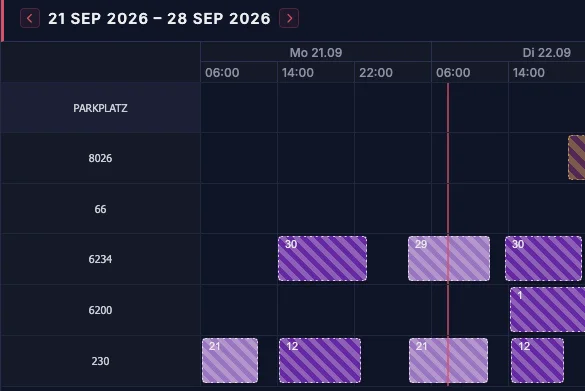
    Who drives which vehicle, and when?

    The shift plan shows for each vehicle which driver is scheduled and when – week by week. Your drivers see open shifts in the app and can apply for them.

    Appointments · Shift plan
    starkcenter shift plan, week of 21 to 28 September 2026: one row per vehicle containing the shifts with the driver's staff number
  2. During the shift

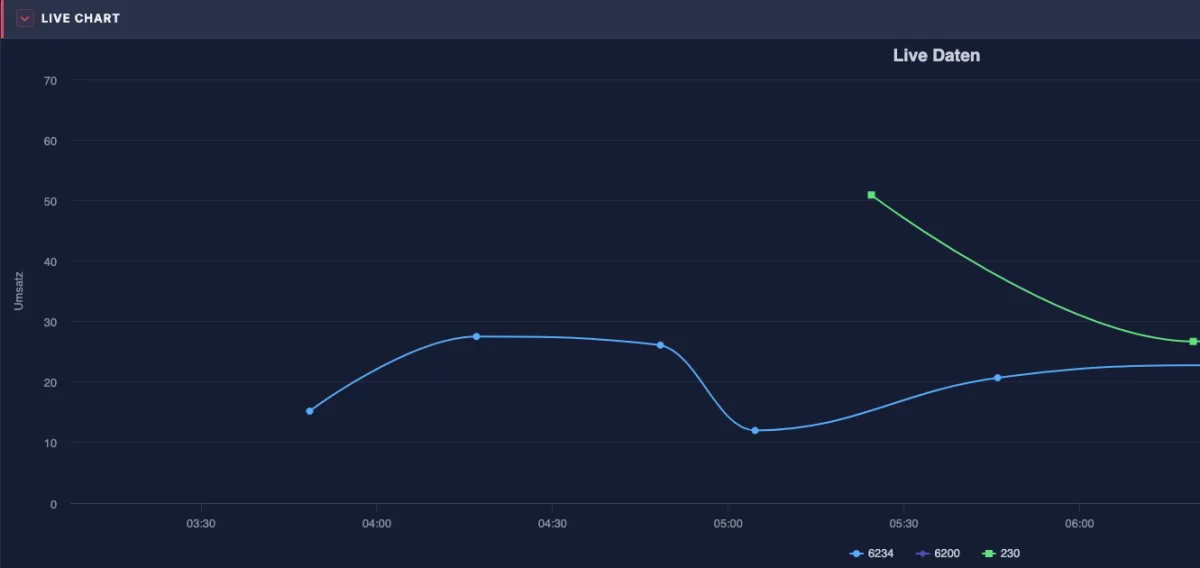
    What have the running shifts brought in so far?

    The live ticker shows the revenue curve of the running shifts per vehicle over the day – from the data the taximeters transmit.

    Live ticker · Live chart
    starkcenter live ticker, live chart: revenue of the running shifts over the time of day, one line per vehicle
  3. After the shift

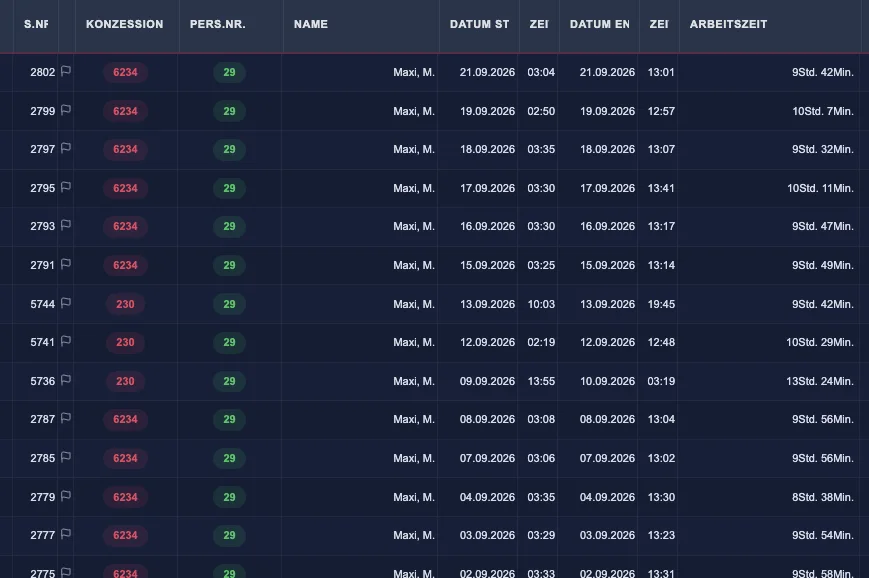
    Which shift belongs to which vehicle and driver?

    The operating record lists every shift with licence, staff number, start, end and the working time shown – from taximeter and app, with no retyping.

    Operating records · Shifts
    starkcenter operating records: list of shifts with shift number, licence, staff number, name, date and time of start and end, and working time
  4. At month end

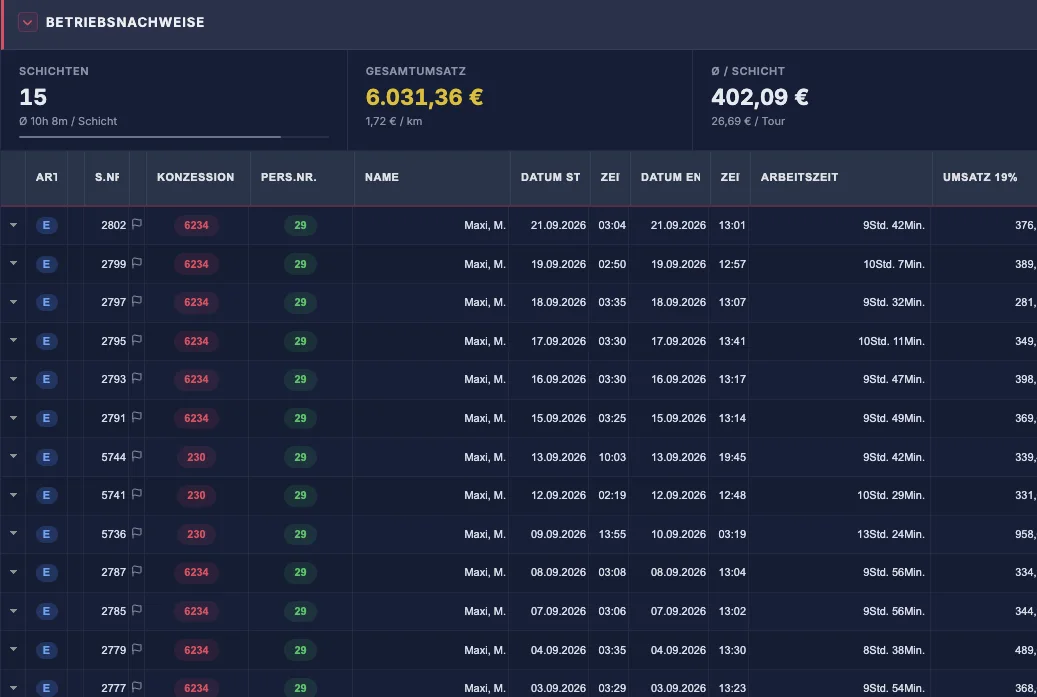
    How did the month go?

    At the top, the totals for the chosen period: shifts, total revenue, revenue per shift and per kilometre. Below, every single shift that makes up those totals.

    Operating records · Month
    starkcenter operating records for September: 15 shifts, 6,031.36 euros total revenue, 402.09 euros per shift, with the individual shifts below
Appointments · Shift plan
starkcenter shift plan, week of 21 to 28 September 2026: one row per vehicle containing the shifts with the driver's staff number

Views from starkcenter with demo data.

Know what is happening in your business.

The cockpit shows the day against the target, revenue per vehicle, open items such as outdated taximeter data or unmatched card payments – and what comes next. Matching and checking remain your decision; starkcenter makes visible where it is needed.

  • Vehicles
  • Data
  • starkcenter
  • Overview
Cockpit
starkcenter assistant cockpit: revenue target 117 per cent of the previous day, revenue against daily target per vehicle, next to it critical issues and expected actions
0
Vehicles active
0
Drivers on the road
0
Journeys today
0€
Daily revenue
0.0h
Working hours

Example values for illustration – not company data.

See the work. Not just the journey.

Journeys, shifts and working times are connected, but they are not the same thing: a free taximeter is not a break. Shift start and end come from the taximeter, breaks are booked by the driver in the app; starkcenter shows the working time per shift and driver – as the basis for the records required under § 17 MiLoG.

  • Shift times and breaks from the app
  • Working time per shift in the operating record
  • Shift plan with clash detection per vehicle and driver
  • Evidence for customs and pension insurance
Operating records · Working time
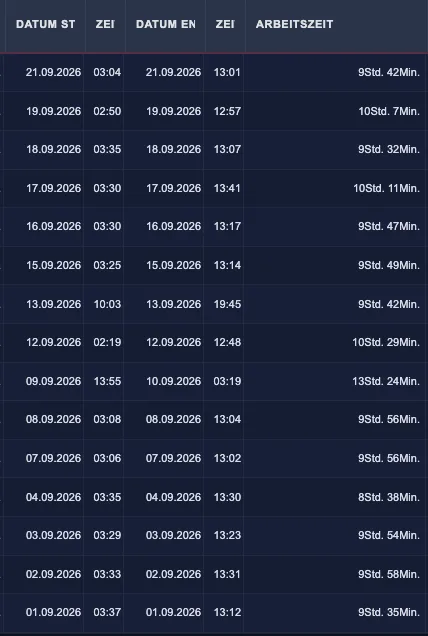
starkcenter operating records, columns date, time and working time: start, end and duration per shift, for example 9 hours 42 minutes

Working time becomes a statement.

The same shift data forms the basis of the staff statement: revenue, working times, supplements, meal allowances and travel allowances are prepared from the operating record. Payroll itself stays with your payroll office – starkcenter supplies the data for it.

  • Staff statement per shift and month
  • Supplements and allowances from the shift data
  • Payroll data export to DATEV and Addison
  • Shift revenue€386.40
  • Working time8:04 h
  • Night supplement22:00–06:00
  • Meal allowanceby absence
  • Travel allowanceper shift

Traceable right into the books.

Revenue, receipts, cash book and customer invoices keep their link to the original journey. You open the bookkeeping month, photograph or upload receipts – starkcenter suggests account and contra account from your chart of accounts, fetches bank transactions via FinTS, and you confirm. Preparation and handover, not financial accounting.

  • Receipt recognition with account suggestion, SKR03/04
  • Bank transactions via FinTS, matching by suggestion
  • Fixed-asset accounting with depreciation, management report (BWA)
  • DATEV posting batch, CSV
  • Fuel receipt · €48.20SKR03 4530
  • Card revenue · €1,208.40SKR03 8400
  • Cash revenue · €2,273.60Cash book
  • Customer invoice · ZUGFeRDSKR03 1400
  • ExportDATEV · CSV

From the taximeter to the tax adviser.

At the end of the chain is your accounting firm. It imports the DATEV posting batch from starkcenter, checks and files – around 90 tax advisory firms work with these exports today. The software prepares; the tax work stays with the firm of your choice, for example starktax, which specialises in taxi and private hire businesses.

  • DATEV posting batch for any accounting firm
  • Around 90 firms use the exports
  • Example starktax: taxi specialisation

Tax advice is provided exclusively by the accounting firm. starktax Steuerberatungsgesellschaft mbH is an independent company.

starkcenter
DATEV posting batch
Your accounting firm

One data flow.
One system.

So that individual pieces of information become a traceable operating process: from the job through the journey to invoicing and payment.

Book a consultation
  1. Taxi
  2. Driver
  3. Taximeter
  4. Journey
  5. Data
  6. starkcenter
  7. Working time
  8. Payroll
  9. Bookkeeping
  10. Tax adviser

What the system makes of the data flow.

Vehicle, driver and office in context: starksoft connects the data and processes that keep your business moving every day – from the shift to the handover to bookkeeping.

The platform for the whole business.

starkcenter is the cloud platform of starksoft Deutschland GmbH: the TSE data centre for taxi and private hire companies. The data from your fiscal taximeters arrives signed in the data centre, where it becomes operating record, settlement, analysis and DSFinV-TW export. Seven reasons, in the order in which they keep you awake at night.

starkcenter login
  1. Getting through the tax audit.

    An audit without usable records ends in an estimated assessment. On repeat, your reliability under the PBefG – and with it your licence – is on the line. Every signed transaction stays unchanged, gaps in the chain are flagged by the system itself – and we check before the auditor does.

    • TSE archiving
    • DSFinV-TW export
    • Operating records per shift
    • Data error alerts
    • TSE-Check
    • Notification under § 146a (4) AO
    • Auditor access via QR
    • Data carrier for audits
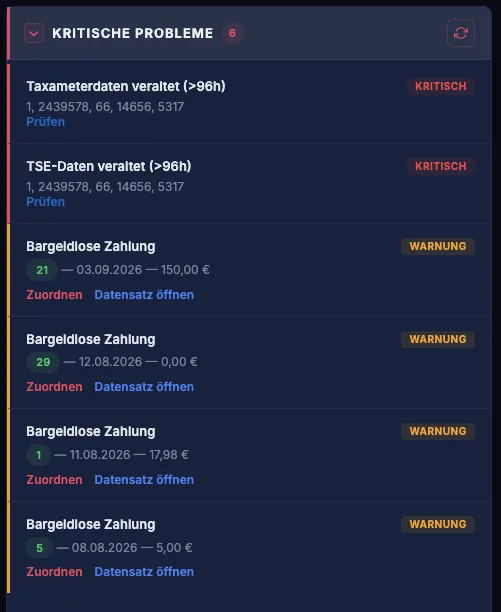
    starkcenter cockpit, Critical issues section: outdated taximeter and TSE data flagged as critical, cashless payments as a warning
  2. The money that was driven actually arrives.

    Clarity instead of paper slips: the driver settlement is built from the real trip data. Card payments and tips are shown separately, trips without the taximeter and no-shows are recorded rather than forgotten. The live ticker shows running shifts and takings.

    • Driver settlement
    • Cashless payments
    • Tips kept separate
    • Live ticker
    • Receipt issuing via QR code
    • Optional receipt printer
    starkcenter live ticker: running shifts with driver, shift start, takings and taximeter status
  3. Working hours that stand up to inspection.

    Record-keeping is mandatory under the ArbZG and the Minimum Wage Act – customs inspect the industry regularly. Working time and breaks are derived from the shift data, the shift schedule checks for clashes per vehicle and driver and warns as limits approach.

    • Working time recording
    • Breaks from the shift
    • Shift schedule with clash check
    • Average shift length with warning
  4. More revenue from predictable business.

    Patient transport under § 302 SGB V with prescription, approval, co-payment and collective invoice per insurer – starksoft is registered with the ITSG Trust Center as a reporting office, so you do not need an additional billing centre. Plus job dispatch with driver suggestions, recurring trips for dialysis and rehabilitation, attributes such as “wheelchair accessible” on vehicle and driver, and a partner network for trips you cannot cover.

    • Patient transport § 302 SGB V
    • Job dispatch
    • Recurring trips
    • Vehicle + driver attributes
    • Partner network
    • Customer invoices & e-invoicing
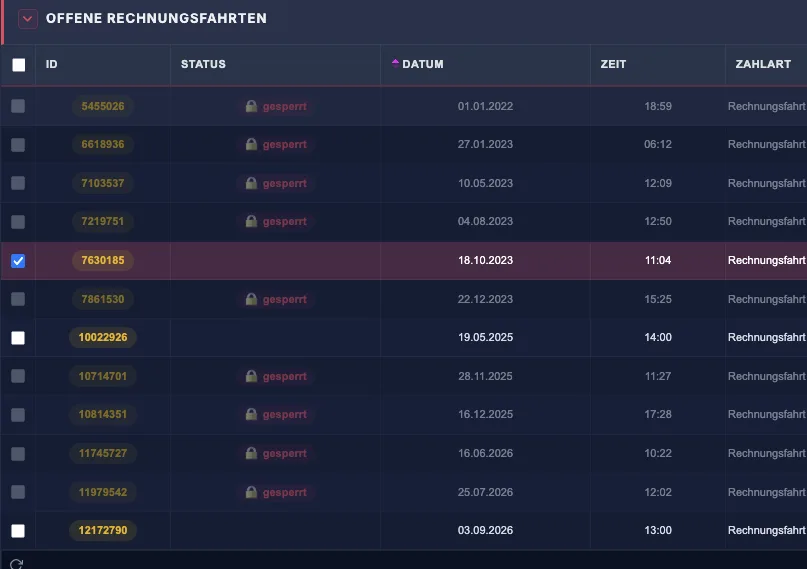
    starkcenter create invoice: open billable trips with date, amount, tax rate and licence, selection for the draft invoice
  5. Winning back the evenings at the office.

    Capture receipts by photo or scan, recognition assigns them. The cash book keeps itself from the shift data, accounts according to SKR03 or SKR04, handover to bookkeeping via DATEV export – payroll data to DATEV and Addison, everything else as CSV.

    • Receipt capture with recognition
    • Cash book
    • SKR03 / SKR04
    • DATEV export
    • Payroll data DATEV + Addison
    • Fixed asset accounting
    • CSV
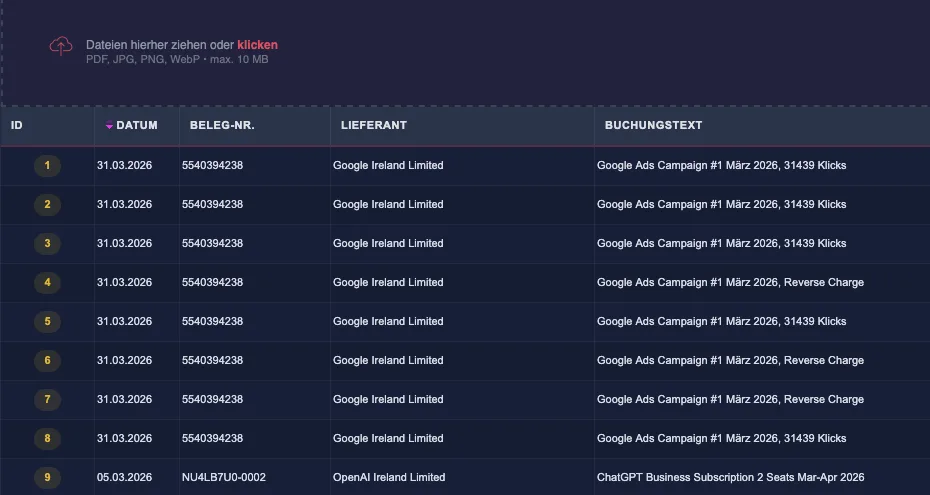
    starkcenter financial accounting: posting journal with receipt upload, debit and credit accounts according to SKR03, status posted
  6. Knowing where the money is made.

    Analyses by vehicle, driver and company: revenue per shift, hour and kilometre, share of occupied kilometres, empty trips, utilisation. With telematics your drivers open and lock the vehicle via the app, you see location, mileage and battery voltage, the immobiliser follows the shift schedule, and you rebook a shift to the replacement vehicle. For profitability surveys under § 54a PBefG the operating summary provides the figures.

    • Cockpit
    • Analyses
    • KPIs per shift / hour / km
    • Telematics
    • Operating summary § 54a PBefG
    starkcenter operating records, KPI strip: revenue per shift and tour, share of occupied kilometres, working time and revenue per hour
  7. Fleet and staff under control.

    Vehicles and licences, staff master data, customer base, parking fines, rental taxi with hire-out, return and journal. Set-up with onboarding, manual in the portal, data error inbox with chat to support, assistance via remote maintenance and telephone.

    • Vehicle & licence management
    • Staff & customer base
    • Parking fines
    • Rental taxi
    • Interfaces API + DATEV
    • Remote maintenance & telephone

The shift in the driver's hand.

One app for Android and iOS, in German, Turkish and English. Every trip, every payment and every receipt is created right at the vehicle and lands in starkcenter without a single paper slip. The business controls the range of functions – there is one app for everyone.

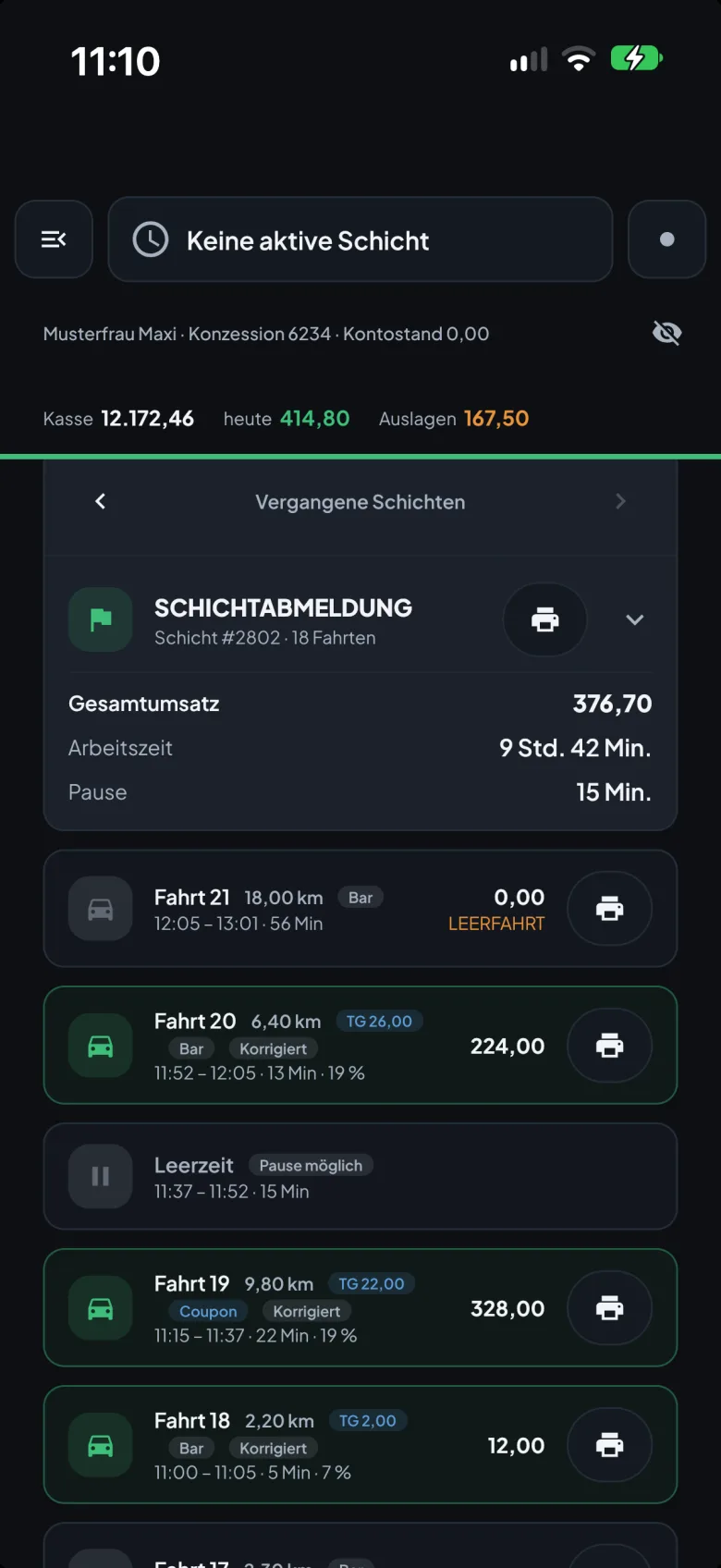
  • Main view of the starksoft driver app: cash, daily takings, expenses and the trips of the last shift
    Main view
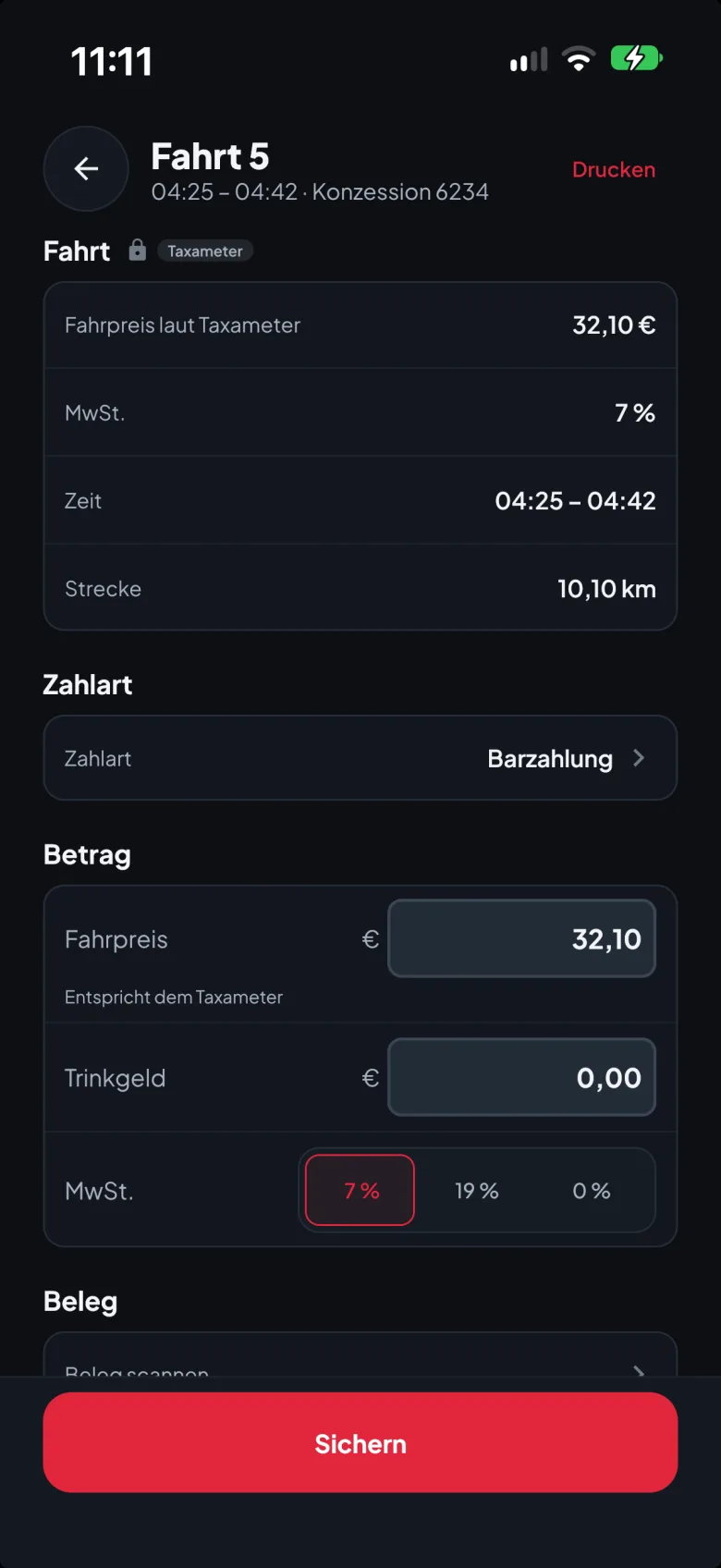
  • Edit trip: fare according to the taximeter, payment method, tip and VAT rate
    Edit trip
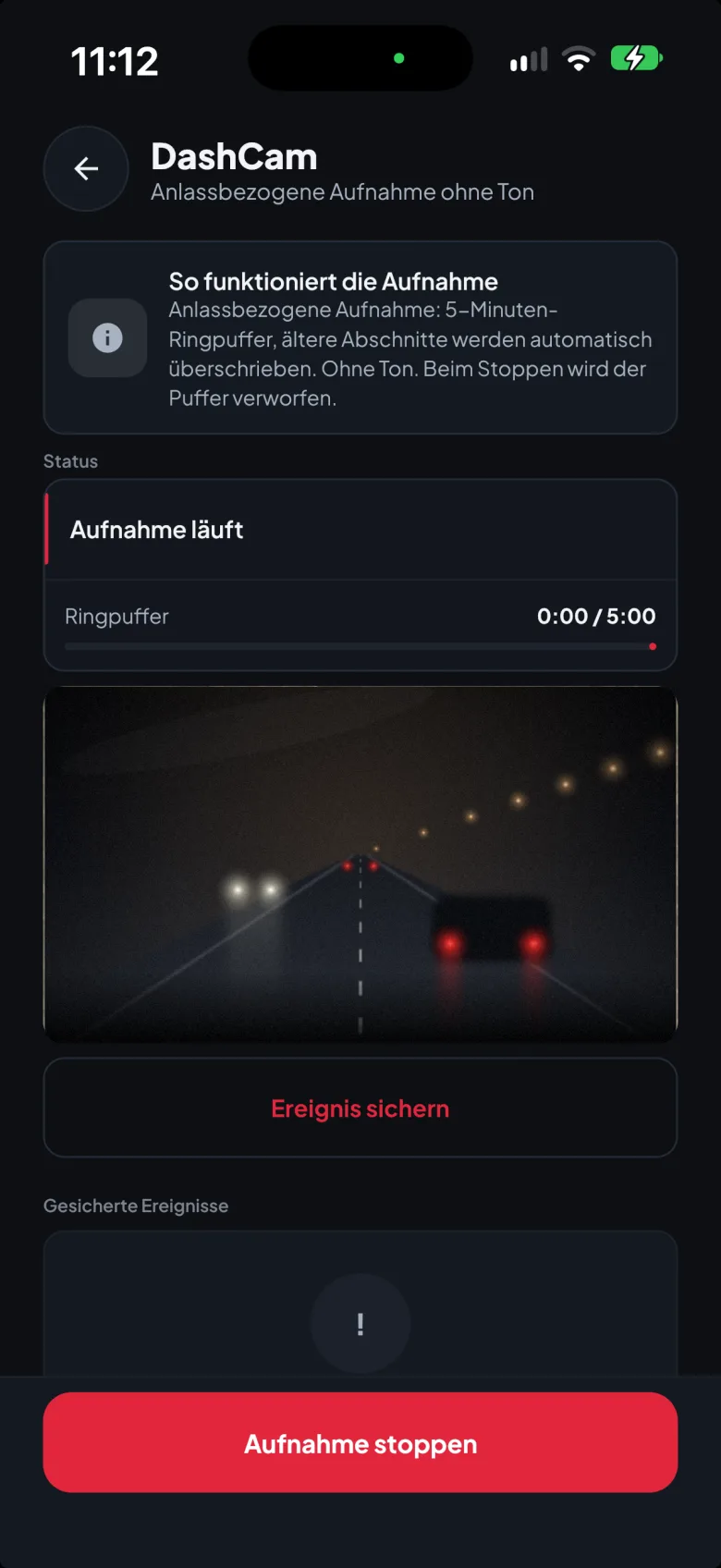
  • DashCam of the driver app: event-based recording without sound with a five-minute ring buffer
    DashCam

App views with demo data.

  • Shift & working time

    The driver signs in to the app with Face ID. The shift starts and ends at the taximeter, the app detects the status and shows driver, vehicle and working time. The driver books breaks in the app. Cash, cash takings, expenses, €/km, €/shift and €/hour on the main view – the business has its record.

  • Trips & corrections

    Trips straight from taximeter and TSE data, empty trips and idle times. Corrections and cancellations are traceable in line with DSFinV-TW: taximeter data stays unchanged, additions are logged.

  • Payment & receipt

    Cashless payment, SumUp with Tap to Pay, tips split between operator and staff, health insurer tariffs with co-payment. Receipt via Bluetooth thermal printer or as a PDF receipt with TSE QR code.

  • Rota, dispatch, accident

    Apply for open shifts, report absence, accept or decline jobs via push, call the passenger, hand over to the maps app. Accident report with photos, witnesses and location.

  • DashCam

    Event-based recording via the smartphone's rear camera: five-minute ring buffer, older segments are overwritten, no sound. The driver saves an event with a tap – as evidence for an accident or dispute, not as constant surveillance.

Card, tip, receipt – right at the vehicle.

The driver records the payment in the app, the terminal takes the card, the printer issues the receipt with the TSE details. Tips are shown separately for operator and staff.

Card payment requires a SumUp merchant account of the business.

  • SumUp Solo

    Card payment with all common cards, Apple Pay and Google Pay, Tap to Pay. The amount comes from the app, the passenger chooses the tip at the terminal.

    €19.90 one-off per driver, set-up included

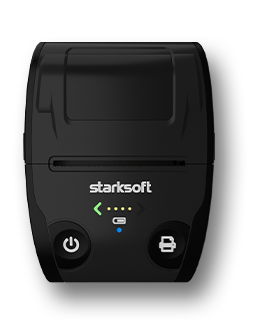
  • starksoft® receipt printer

    Receipt and shift sheet via Bluetooth from the app, with TSE details and QR code. Alternatively the receipt goes to the passenger as a PDF by e-mail.

    €129.90 one-off, incl. 10 thermal rolls and set-up

For Android and iOS

Driver app in detail

Audit-ready before anyone asks.

Your taximeter is an electronic recording system under § 146a AO. Since 2026 the TSE (technical security system) requirement applies to EU taximeters and odometer-based fare meters without a transition period. starkcenter archives the TSE data in an audit-proof way and creates the DSFinV-TW export from the signed raw data – at the touch of a button.

  • DSFinV-TW export

    We check every export with the same software the tax audit uses – until no errors and no warnings remain. In the event of an audit we prepare the data and deliver it on a data carrier.

  • TSE-Check & data errors

    We do not wait for the audit, we check ourselves: the TSE-Check verifies the signed chain, the data error inbox reports gaps and implausible data with licence and timestamp.

  • Auditor access via QR at the vehicle

    During a cash register audit the auditor scans the QR sticker on the vehicle, sees master data and procedural documentation and requests the DSFinV-TW export with their service ID and a time period. The driver approves in the app, the operator does not need to be present. The download is time-limited, every access is logged.

  • Notification under § 146a (4) AO

    The notification procedure for taximeters and odometer-based fare meters runs directly from starkcenter via the integrated ERiC interface. Changes subject to notification – new vehicle, decommissioning, TSE replacement – are detected.

  • Devices & Alive-Service

    Compatible with fiscal taximeters from HALE, Semitron and Taxitronic via their TSE; telematics via INVERS, card payment via SumUp. Mobile SIM in the device, costs included in the plan. Alert when a taximeter has been inactive for 120 hours.

The vehicle, even when nobody is in it.

With the INVERS telematics box the vehicle becomes part of the system: the driver opens and locks it from the app, with no key handover. The immobiliser follows the shift schedule, the office sees location and condition and rebooks a shift to a replacement vehicle.

  • Open & lock via app

    Before the shift the driver unlocks the vehicle from the app, after the shift they lock it. Access applies only to the shift assigned to them – keys no longer need to be handed over.

  • Share a vehicle

    If a vehicle breaks down, the office rebooks the shift to a replacement vehicle. The driver locates it in the app, drives there and opens it – even at night, without anyone bringing the key.

  • Release via the shift schedule

    The immobiliser releases the vehicle because the company has assigned the driver to this vehicle for this time in starkcenter. Without an assignment it stays locked – a separate release by the office is not required, but possible at any time.

  • Condition & location

    Location, doors, windows, mileage and battery voltage at a glance. The location appears in the live ticker and in the operating record, even without a running shift.

  • Alerts from the vehicle

    The box reports what the office needs to know: collision detected, battery low, fuel low, alarm input triggered. Alarm system and interior monitoring are available as optional extras.

  • Insurance

    Telematics data as the basis for telematics tariffs of the motor insurer – the premium then depends on actual driving behaviour.

Telematics module €19.90 per vehicle and month, net plus VAT. Requirement: INVERS telematics box in the vehicle, available from the PREMIUM data plan.

Driven. Documented. Billed?

The recorded trip is the starting point. Who the invoice recipient is, which agreed price applies and whether payment has arrived is decided afterwards – in the office.

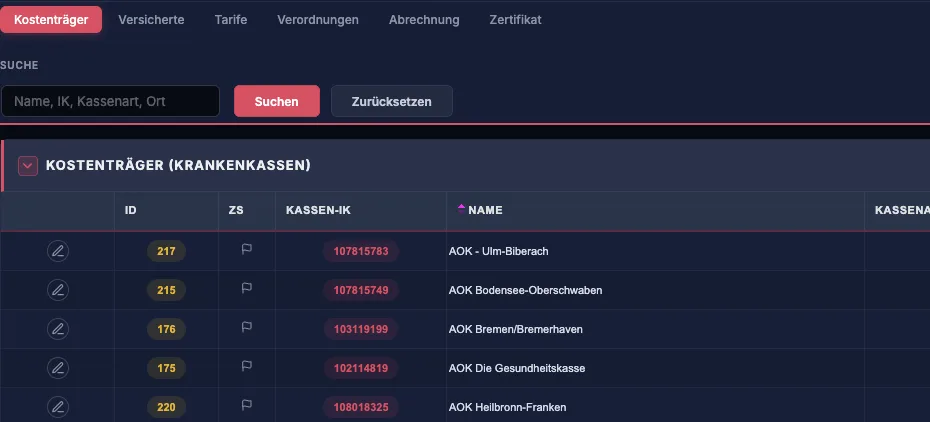
  • Patient transport under § 302 SGB V

    starkcenter health insurer billing: tabs for payers, insured persons, tariffs, prescriptions, billing and certificate, below payers with insurer IK number

    With patient transport more than the distance counts: prescription (form 4) and approval are attached digitally to the trip, the patient's co-payment is taken into account in the fare, the collective invoice per payer is built from the recorded trips. starksoft is registered with the ITSG Trust Center as a reporting office – you do not need an additional billing centre. Recording, prescription management and collective invoicing from day one, electronic submission once the trial with the data acceptance offices is complete.

    One trip. Several payment steps.
    Agreed transport fee
    €60
    Patient's share (co-payment)
    €6
    Claim against the payer
    €54

    Simplified example with fictitious amounts. €6 and €54 are parts of the same service, not additional revenue.

    Available as an add-on from the Premium data plan, from €12.90 per vehicle and month, net plus VAT.

  • An invoice is not yet a payment received.

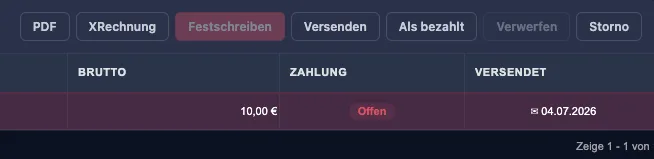
    starkcenter invoices: toolbar with PDF, XRechnung, finalise, send and mark as paid, below a finalised invoice
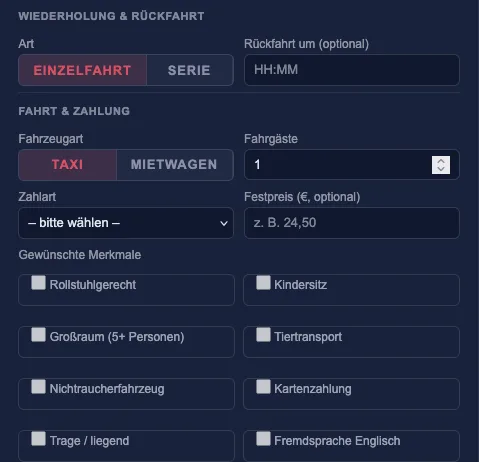
    starkcenter job dispatch, new job: single trip or series, taxi or private hire vehicle, requested attributes such as wheelchair accessible, child seat or minivan

    Customer invoices are created from the trip records – as PDF, XRechnung or ZUGFeRD according to EN 16931; billed trips are locked and do not appear a second time. Every invoice carries its payment status: finalised, sent, open or paid. So it stays visible what has been billed, who has to pay which amount and which invoice is still open. Pre-bookings run through job dispatch: single trip or series, attributes such as “wheelchair accessible” on vehicle and driver, forwarding to partner businesses.

    Job dispatch €12.90 per vehicle and month, net plus VAT, requires the PREMIUM data plan.
One fixed price per vehicle. No small print.

  • BASIS

    14.90€ / Fahrzeug · Monat

    TSE archive and records

    • Alive-Service
    • Operating records
    • Export (CSV)
    • GDPdU data set
    • Remote maintenance & telephone support
  • Recommended

    PROFI

    24.90€ / Fahrzeug · Monat

    Business and staff

    • Everything in BASIS
    • Analyses
    • Income/expense list
    • Staff settlements
    • Working time recording
    • Payroll data export DATEV / Addison
    • Parking fines, appointments, live ticker
    • Driver app
  • PREMIUM

    34.90€ / Fahrzeug · Monat

    The whole business

    • Everything in PROFI
    • Electronic cash book
    • Vehicle & accident management
    • Shift schedule
    • Digital receipts & archive
    • Telematics functions
    • Basis for the patient transport module
  • Patient transport module

    from €12.90 / month & vehiclerequires PREMIUM
  • Job dispatch

    €12.90 / month & vehiclerequires PREMIUM
  • Bookkeeping module

    €19.90 / month & vehiclerequires PROFI
  • Telematics module

    €19.90 / month & vehiclerequires PREMIUM
  • starksoft® receipt printer

    €129.90 one-offincl. 10 thermal rolls and set-up

All amounts net plus VAT, per vehicle and month, including the taximeter's mobile connection. No minimum contract term, no sign-up or set-up fee. Billing only starts once the TSE is in operation.

Create account

Your accounting firm gets postings, not boxes of paper.

The bookkeeping module in starkcenter prepares the bookkeeping. Financial accounting, review and filings with the tax office remain with your tax advisory firm – the one you already work with today, or a new one.

Around 90 tax advisory firms work with exports from starkcenter today.

  1. Capture receipts

    Photograph a receipt or upload it as a PDF: date, supplier, amounts and the matching accounts from your chart of accounts (SKR03 or SKR04) are suggested by starkcenter. You confirm, and the receipt is posted.

  2. Reconcile the bank

    starkcenter fetches bank transactions via FinTS directly from your bank and suggests the matching posting for every receipt – open, matched or ignored stays visible. Fixed assets with depreciation (AfA) and a BWA run on the same postings.

  3. Hand over to the accounting firm

    At month end a DATEV posting batch in EXTF format is created, which every accounting firm can import. Cash and payroll data go via their own exports, payroll optionally to DATEV or Addison.

Financial accounting · Receipt upload and journal
starkcenter financial accounting: upload receipts, posting journal with debit and credit account according to SKR03, status posted
Bookkeeping module19.90 € per vehicle and month, net plus VATReceipt recognition, bank retrieval, fixed asset accounting and DATEV export included. Requires the PROFI data plan.

Serving the taxi and private hire trade since 2013.

starksoft Deutschland GmbH develops software and digital infrastructure for taxi and private hire companies in Berlin: the TSE data centre starkcenter, the driver app and the interfaces to taximeters, payment services and tax advisory.

Registered office
Lützowplatz 4, 10785 Berlin
Devices & partners
HALE · Semitron · Taxitronic · INVERS · SumUp
Registration
ITSG reporting office for § 302 SGB V
Trade fair
Eurotaximesse Cologne, 6–7 Nov 2026, stand A04

Support is based in Berlin.

Assistance via remote maintenance and telephone is included in every plan. Consulting, support and development work under one roof – whoever calls speaks to people who built the system. The data error inbox in the portal has a direct chat channel to support.

Service hours
Mon–Fri 9:00–17:00
Remote maintenance
Directly on your screen, on request

Everything comes together.
Live in Cologne.

6 and 7 November 2026, Koelnmesse, stand A04. We show the running software with real workflows – and set up the driver app with you right at the stand.

Stand
A04
Date
6–7 Nov 2026
Venue
Koelnmesse, Cologne

How do the processesfit together in your business?

Talk to us about which processes starksoft can support in your taxi or private hire business – on screen, with your vehicles and your questions. No obligation, no slides.

Or create an account right away